Internal Documentation
Internal technical documentation for the Allaria Group platform. This section is restricted to Allaria staff and is not part of the public API documentation.
This section requires the INTERNAL_VIEWER role. Do not share links to these pages outside Allaria.
Scope
This section is for documentation that is not meant for external API clients, such as:
- Internal service architecture and how services reach the b2b gateway
- Operational runbooks and troubleshooting guides
- Internal-only endpoints and administrative tooling
- Environment and infrastructure references
Client onboarding
The six manual steps to give a new external client access to the b2b API, in order. Ceibo is the reference case throughout.
1. Whitelist the client's IPs on the b2b ALB
Ask the client for the public egress IPs their integration will call us from (the NAT's IPs if they are behind one), for each environment they will use.
Until they are whitelisted, requests are dropped at the network layer and the client sees a connection timeout, not an HTTP error.
In allaria-tech/infrastructure, add an entry to the b2b_alb_clients local:
| Environment | File |
|---|---|
| Development | development/us-east-1/ec2/load-balancing/b2b.public.load.balancer.tf |
| Production | production/us-east-1/ec2/load-balancing/b2b.public.load.balancer.tf |
{
  name = "<client-name>"
  ips  = ["<ip-1>", "<ip-2>", "<ip-3>"]
},
Bare IPs and CIDR blocks are both accepted (a bare IP is normalized to /32). Nothing else changes — the rules are generated from that list.
- Open the PR.
- Check the plan only adds
aws_security_group_ruleresources. - Merge and apply.
Reference: chore: add ceibo ips to whitelist (#1355).
2. Create the client's clientId in Keycloak
In allaria-tech/infra-tf-keycloak-identity-management, create <client-name>.tf at the repo root:
module "<client-name>" {
  source      = "git@github.com:allaria-tech/infra-terraform-modules.git//keycloak"
  name        = "<client-name>"
  description = "credenciales para que <client-name> consulte sobre sus comitentes"
  assigned_roles = {
    bymas = {
      "roles" : ["BY_MAS_OPERATOR"]
    }
  }
}
assigned_roles lists the roles the client needs, keyed by the client that owns them:
- Querying its own comitentes through bymas (the usual case): only
BY_MAS_OPERATOR. - Anything else (market-data, opex, api-assets-transfer…): copy the role name from that service's own
.tfin the same repo.
Watch out for:
nameaccepts only lowercase and hyphens; if it needs an underscore, addconvention_disabled = true.descriptioncannot contain quotes or backticks.- If the client already exists in Keycloak, add
enable_import = true— otherwise the apply fails with409 Conflict.
One file per client, applied to each environment through profiles/development.tfvars / profiles/production.tfvars.
Reference: added ceibo clientId with bymas role (#155).
3. Add the bymas_client_id mapper
Manual step in the Keycloak admin console — internal host, not covered by Terraform, so it has to be done once per environment:
- Production: https://keycloak.svc.internal.allaria.cloud/admin/master/console/#/main
- Development: https://keycloak.svc.internal.allaria.dev/admin/master/console/#/main
realm main → Clients → <client-name> → Client scopes → <client-name>-dedicated → Add mapper → By configuration → Hardcoded claim
| Field | Value |
|---|---|
| Mapper type | Hardcoded claim |
| Name | bymas_client_id |
| Token Claim Name | bymas_client_id |
| Claim value | the client's id (Ceibo → 102) |
| Claim JSON Type | long |
| Add to ID token | On |
| Add to access token | On |
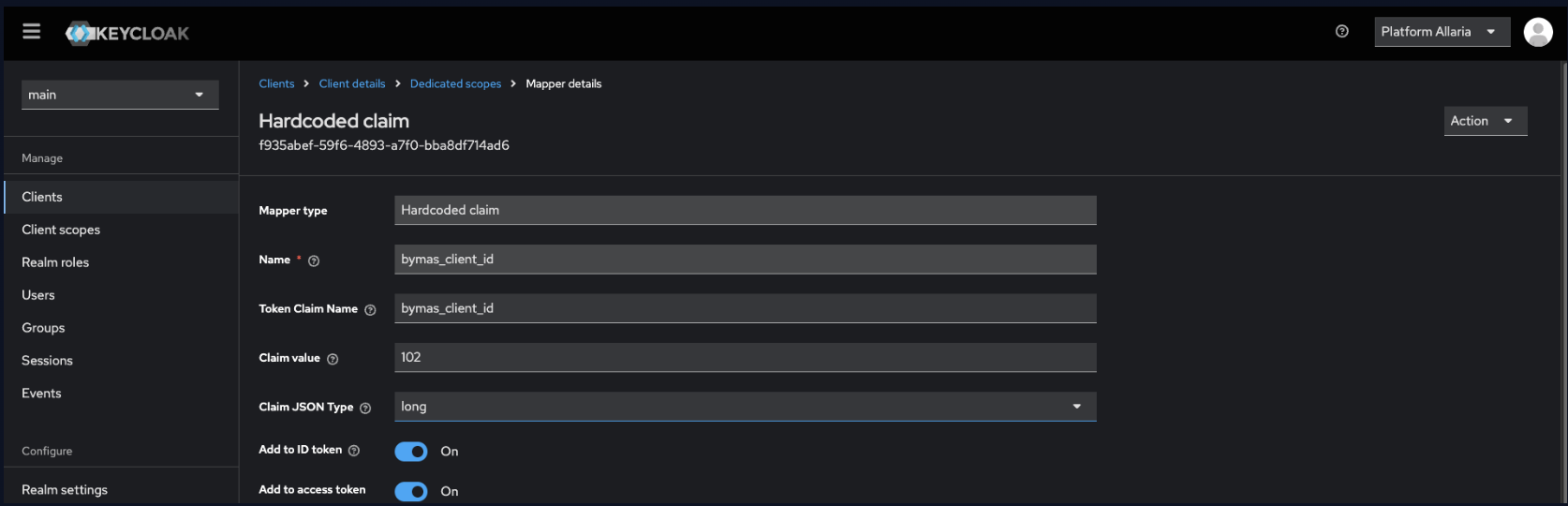
There is no registry and no automatic assignment for bymas_client_id — the values are handed out by hand as clients are onboarded (Ceibo got 102). Ask before setting it; a collision would let one client resolve against another's accounts.
To verify, request a token with the client's credentials and decode it: the payload must contain "bymas_client_id": <id> as a number.
4. Link the shared account holders to that id
Registers which Allaria accounts the client is allowed to see. Until an account is linked, its positions and movements come back 403.
/by-mas/client-relationshipsInternal admin endpoint on bymas's own host — deliberately not exposed through the b2b gateway, so no https://b2b.allaria.cloud and no /v1. Use the .dev host for development.
curl --request POST \
  --url https://by-mas.svc.internal.allaria.cloud/by-mas/client-relationships \
  --header 'Authorization: Bearer {{token}}' \
  --header 'Content-Type: application/json' \
  --header 'X-Client-Origin: ALLARIA_MAS' \
  --header 'accept: */*' \
  --data '[
  {
    "client_id": 102,
    "account_id": 500185,
    "company": "ALLARIA"
  }
]'
| Field | Type | Required | Description |
|---|---|---|---|
client_id | number | Yes | The id from step 3. |
account_id | number | Yes | The account number at Allaria to link. |
company | string | Yes | ALLARIA, ALLARIA_MAS or ALLARIA_DIGITAL. |
should_delete | boolean | No | true unlinks instead of linking. |
The body is always a list, so several accounts can be linked in one call.
Response: { "created": "1", "deleted": "0", "unchanged": "0" } — already-existing links count as unchanged rather than failing.
Clients no longer call this endpoint themselves: Allaria links accounts automatically, and clients can only check the state through Link accounts. Use the internal host here when a link has to be created or fixed by hand.
Use the internal host here when you need to link accounts on a client's behalf with an admin token.
{{token}} must be an Allaria+ admin token (Firebase), sent with X-Client-Origin: ALLARIA_MAS. The client's own Keycloak token is rejected here — it cannot link its own accounts.
If any account_id does not exist for the given company, nothing in the batch is applied. Send small batches and double-check account numbers and their company.
5. Give the client's people access to this documentation
Add the emails the client sent us, one per person, in authz under the external-docs application:
- Production: https://authz.app.internal.allaria.cloud/applications/external-docs/users
- Development: https://authz.app.internal.allaria.dev/applications/external-docs/users
Agregar Usuario → email → role ALL_VIEWER → save.
ALL_VIEWER grants every product tab and does not reach the Internal tab, which is why it is the default for client contacts.
- If the client should only see part of the site:
ALYC_VIEWER/WALLET_VIEWER(or a controller role). - Never assign
INTERNAL_VIEWERto a client.
If the person gets Access Denied, the email in authz does not match the one they log in with.
6. Send the credentials to the client
In the Keycloak admin console — Clients list (production), Clients list (development) — open realm main → Clients → <client-name>:
| What | Where |
|---|---|
| Client ID | Settings tab |
| Client Secret | Credentials tab — eye icon to reveal, copy icon to copy |
- Ask the client which address to send them to, and confirm it with your known contact.
- Send the secret through OneTimeSecret — the link, never the value in the body of an email or chat.
- Include the
clientIdand a link to the Authentication page (grant_type=client_credentialsagainstPOST /auth/token). - Remind them only the IPs from step 1 can reach the API, and that new ones have to be requested in advance.
Rotating the secret on the Credentials tab breaks the client's integration until they load the new one. Coordinate it with them.
Conventions
Pages here follow the same rules as the rest of the site:
- Every page must exist in English (
internal/) and Spanish (i18n/es/docusaurus-plugin-content-docs-internal/current/). - Endpoint pages use the
ApiEndpointcomponent and the structure defined inENDPOINT_TEMPLATE.md. - Base URLs use the
https://b2b.allaria.cloudplaceholder — never hardcode a domain.
Adding a subsection
Create a subdirectory inside internal/ with a _category_.json defining its label and position, then mirror it under i18n/es/docusaurus-plugin-content-docs-internal/current/ with the Spanish label.